We remain fully operational. Our teams are working around the clock to ensure your deliveries continue safely.

DOWNLOAD THE APP


Copyright © 2025 Desertcart Holdings Limited
DOWNLOAD THE APP


Buy anything from 5,000+ international stores. One checkout price. No surprise fees. Join 2M+ shoppers on Desertcart.
Desertcart purchases this item on your behalf and handles shipping, customs, and support to Turkey.
🚀 Elevate your network game with pro-grade speed and control!
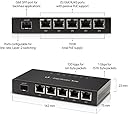
The Ubiquiti EdgeRouter X SFP is a compact, high-performance router featuring five gigabit Ethernet ports with passive PoE, a dedicated gigabit SFP port for fiber backhaul, and a powerful 880 MHz dual-core processor paired with 256 MB RAM. Running on the advanced EdgeOS, it offers professional-grade configurability and reliability, making it ideal for tech-savvy users seeking to build a robust, future-ready home or small office network.
| ASIN | B012X45WH6 |
| Antenna Location | Home |
| Antenna Type | Internal |
| Best Sellers Rank | #6,172 in Computers & Accessories ( See Top 100 in Computers & Accessories ) #245 in Computer Routers |
| Brand | Ubiquiti Networks |
| Color | black |
| Compatible Devices | Personal Computer |
| Connectivity Protocol | Ethernet |
| Connectivity Technology | Ethernet |
| Control Method | App |
| Controller Type | Switch |
| Customer Reviews | 4.1 4.1 out of 5 stars (515) |
| Data Transfer Rate | 1 Gigabits Per Second |
| Frequency | 880 MHz |
| Frequency Band Class | Single-Band |
| Global Trade Identification Number | 00810354021817, 00810354028649 |
| Has Internet Connectivity | Yes |
| Has Security Updates | Yes |
| Is Modem Compatible | No |
| Item Dimensions L x W x H | 5.59"L x 2.95"W x 0.91"H |
| Item Weight | 0.6 Kilograms |
| LAN Port Bandwidth | 1.0 gigabits_per_second |
| Manufacturer | Ubiquiti |
| Maximum Upstream Data Transfer Rate | 1000 Megabits Per Second |
| Mfr Part Number | ER-X-SFP |
| Model Name | EdgeRouter X ER-X-SFP |
| Model Number | ER-X-SFP |
| Number of Ports | 5 |
| Operating System | Edge Operating System |
| Other Special Features of the Product | WPS |
| RAM Memory Installed | 256 MB |
| Router Firewall Security Level | True |
| Router Network Type | Ethernet |
| Security Protocol | WPS |
| UPC | 053926243433 810354028649 810354021817 |
| Unit Count | 1 Count |
| Voltage | 24 Volts |
| Wireless Compability | 802.11ac |
D**F
Solid router with good feature set.
Soid dependable router. Fairly easy to install and configure and has a good selection of features. This is an edge router so you need to configure it directly. It does not connect with the UniFi controllers that Ubiquiti sells. Be warned.
D**N
Solid router (with tons of potential) at a great price
I bought this as the first piece of my all Ubiquiti network setup. I wanted to replace my ASUS all in one AC router because of constant restarts and inconsistent wifi performance. It was a good router, but it can't compare to my new system of dedicated router (this), switch, and access point. In the three months I've had my system, there has not been a single issue with internet speeds or connection, or with wifi performance. It is rock solid now and there haven't been any complaints from the family about the internet being down. This router just routes. It isn't encumbered by the need to be the AP as well. I do use the switch function on this however, and it is very configurable, pretty close to a managed switch. It is also capable of passive POE power, which I am not using currently. The SFP port can be configured as the WAN port if you need another port. This is all in a small, well built metal case. The one downside is that it's not the easiest to configure in this current age of consumer routers, but it's still not hard with the wizards and all of the information and support available online. If you are skilled or determined, there is so much configuration this router is capable of. If you get by the initial setup hurdle, the separated router and AP combo is a gamechanger for people like me. The wifi is no longer tied to wherever the router has to be. It can go in the most central or needed location in the house, and you can have more AP's if needed. This is the first step toward non-sucky internet.
B**R
Great Router
Not for beginners with little patience. Having used Cisco and FortiNet. All for work. So I have a Linksys LRT2x4 for my house and it just didn't allow enough configuration for my desire. I had several UAPs and just bought a 8 port POE Ubiquiti switch and was very happy with the ease of use and low price for my home setup. Bought this router and found it to be a great little device. Was very easy to update the firmware and get it running. The wizards are easy to use but the syntax is different from others so it took me a little reading to understand what the device wanted to do. Once running, I had my network configured with VLANs for wireless guests and secure network for my home equipment with proper ACL (firewall) settings for access between networks for printers etc. Remote management is not wizard-based (as of this review) and it took a forum search to find the suggested way of enabling it for your setup. Easy to do, once I found the method they want to be used. Throughput is near GB speeds. The router is handling the traffic very well. My Linksys router often had issues or delays while I was accessing my Armcrest NVR. With this router, the load time is noticeably faster and HD video is clear instantly. (no real buffering noticed like from Linksys) If you want to get this router or any Ubiquiti products, I would point you to a YouTube channel, Crosstalk Solutions. He does a very good run down of several products (this router as well) and how they are used/configured. Only weakness (in terms of configuring) I would note is the Remote VPN access. I am surprised a wizard or better configuration page doesn't exist. I'm sure it will come out, but not as of this review. Very impressed. I will buy a couple more to use in my work locations to see if they can handle networks of 100 and 500 stations. However for home use, this is a fantastic buy.
Y**S
great value for power users - not for the casual SOHO user
LAST UPDATE, 6-1-20: The power cord to the wall-wart comes off the opposite side from the network ports. This is fine if you're going to mount it to a wall, but not so great on a desktop, benchtop, etc. UPDATE, 4-3-20: I needed to look at QoS so my other half couldn't saturate our pipe with video feeds when I was working. The EdgeRouter had everything I needed, and the Traffic Analysis feature made it easy to verify who the culprit was (out of 4 users). This is really sexy little box for the money. I haven't felt this satisfied with a computer or networking purchase in over a decade, fo' reelz. ;) UPDATE, 2-16-20: I was seeing terrible (250mS+) loaded latency on my new faster service. Big ratio between loaded and unloaded. So I learned about BufferBloat, and the specific, modern, Smart Queue Management strategies (in my case: Fair Queuing - FQ - with Controlled Delay -CoDel) which fix buffer bloat -- features not available on most commodity SOHO routers. This feature can be turned on in the ER-X router's GUI without digging into the CLI. A small amount of tuning of the two bandwidth numbers was required to achieve much lower latency without impacting my connection speeds. Implementing modern network traffic management tools like SQM or QoS is often quite fiddly, requiring more arcane knowledge than I have, and I do this stuff for a living. So it was a pleasant surprise to be able to turn it on and have it working properly in under five minutes. -------- original review: I knew Ubiquiti network hardware from the corporate world, they offer decent value for money. That said, this is a business product. It's vastly over-powered for a home broadband connection. If you're a power user who can benefit from being able to remotely access / VPN to your home network from afar, or you actually have a use case for Quality of Service / Traffic Shaping / SQM (gamer or a network TV perhaps) then $100 for this little gem is a very wise purchase. But you had best know what you are doing; Ubiquiti's product documentation consisted of a QR code leading to their web site. Not so much as a disk or even a pamphlet came in the box. I had better luck finding the config document I wanted with Google than using Ubiquiti's search on their own site. So if you need hand-holding when setting up networking stuff, buy something else. This is not a $39 Netgear "router" with woo-woo "True Diversity" antennas. This is an actual boundary router appliance, don't let the tiny form factor fool you. 15 years ago, a box with the same capabilities was a 1U rack mount device and cost $4,000.
C**N
Excelente calidad de los productos Ubiquiti. Un gran número de características de productos de marcas más costosas, pero a precios menores. Administración de características básicas a través de interfaces fáciles de usar, pero también la posibilidad de administrar desde consola todas las características disponibles. Migrando nuestra infraestructura a productos Ubiquiti.
S**A
I have been using off the shelf routers with my BSNL ADSL service for many years now, The regular Linksys, d-link, tp-link type devices cannot handle more than 3-4 wifi clients simultaneously, I have had severe buffering issues playing HD videos between devices just a few feet away from each other, I suspected it had something to do with the memory/cpu on these devices and I was right about it. I still use my old TP-Link device to connect to BSNL but I now bridge the pppoe connection to this Edgerouter and all my streaming issues have magically disappeared, This device also powers my Unifi AP with POE and saves me on some of the cabling mess. This is a great router for a small home or office network with more than 2-3 devices.
A**R
The product came with a EU plug instead of the UK plug for Singapore...
S**.
You need a YT tutorial to get it admin'ed - apart from that: amazing product. Easy to understand, after watching the tutorial.
A**O
Produto Novo qualidade, entrega super rápida, roteador edgerouter fácil uso....
Trustpilot
2 months ago
3 weeks ago